Excalidraw for macOS · free & open source

Excalidraw, at home on your Mac.

A fast, local-first desktop app for Excalidraw. Every drawing is a plain .excalidraw file in a folder you pick, synced by iCloud Drive and drawn at 120Hz. Claude Code and Codex can sketch on it with you.

macOS 13+ · Apple silicon (Intel build below) · MIT · v0.6.0

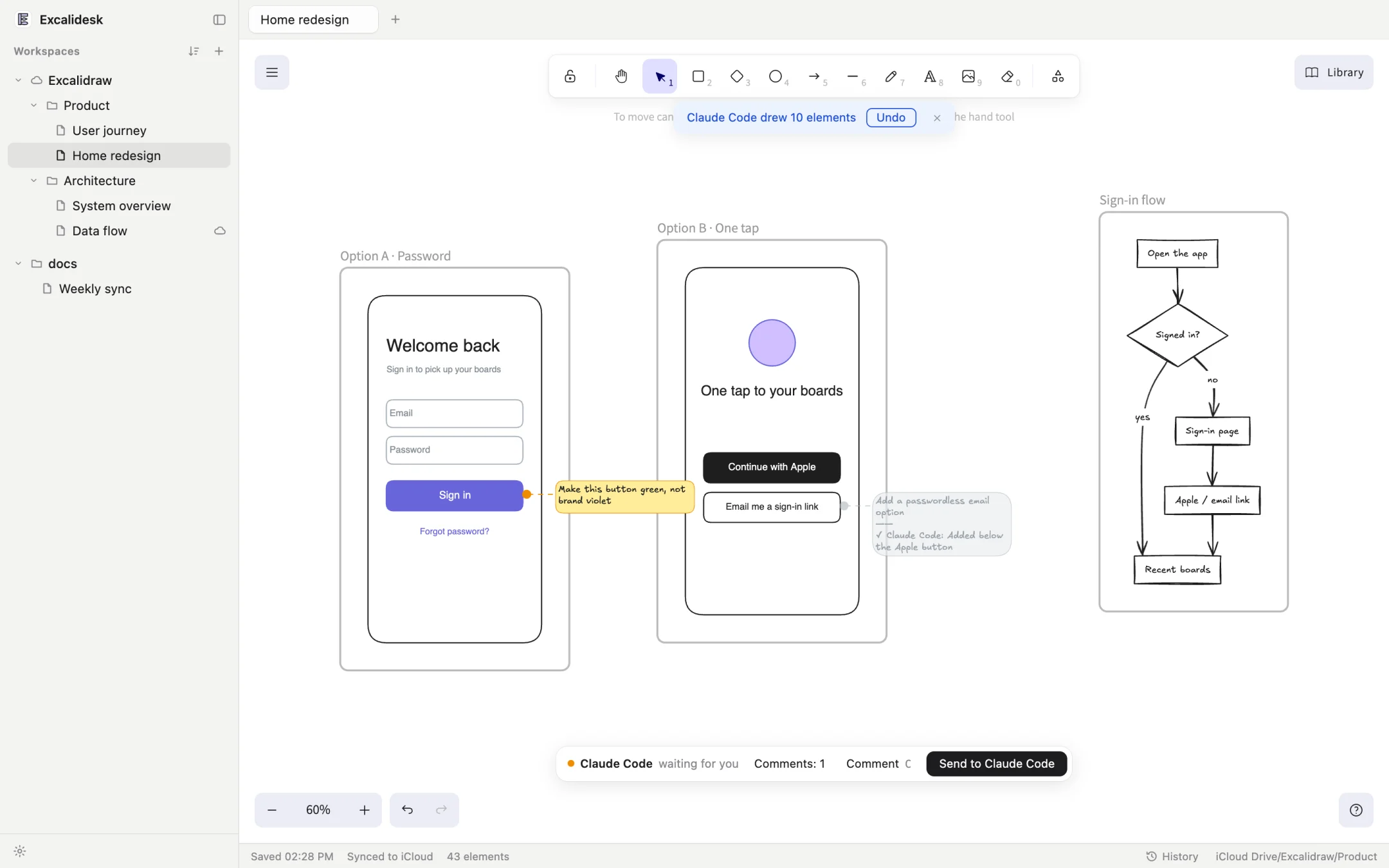
Excalidesk: an iCloud Drive workspace in the sidebar, a drawing where Claude Code sketched two sign-in options and a flowchart, and a comment pinned to a button
  1. 1Folders, not a library. A workspace is any folder, on iCloud Drive or off it. Every drawing is a .excalidraw file that opens anywhere.
  2. 2Agents draw in your drawing. What Claude Code adds is saved and versioned like your own edits, with one Undo.
  3. 3Press C to comment. Pin a note to any element. The agent gets it with what it points at, and marks it done.
  4. 4You decide when to send. The agent waits. Nothing goes back until you press Send.
  5. 5Saved, synced, kept. Incremental saves, live iCloud status, and local history to restore from.
120fps panning and drawing on ProMotion
21MB download, not a whole browser
0accounts, servers or databases
1file format: plain .excalidraw

Draws like Chrome. Weighs like a Mac app.

Mac apps that embed a web view get 60 fps, even on a 120Hz screen. Excalidesk lifts that cap, so panning and freehand strokes keep up with your hand at 120 fps, the same as Chrome.

  • Saves without stalls. Only the elements that changed go to the Rust side, so a big drawing never freezes while it saves.
  • Images cross once. Each image is sent the first time it appears, not re-encoded on every save.
  • Scrolling isn't an edit. Your viewport stays out of the file, so panning around never triggers an iCloud upload.

Frame rate panning at 100% zoom, M1 Pro with ProMotion

Web view, default
60 fps · 17 ms
Excalidesk
120 fps · 8 ms
Chrome
120 fps · 8 ms

Your screen, right now: …

Sketch it out with your agents.

Claude Code, Codex and other MCP clients open drawings in Excalidesk and sketch prototypes, flows and architectures, one option per frame. You edit right on the canvas or pin comments, then send it back. They revise and reply.

  1. 1

    The agent sketches

    Wireframes, flowcharts, Mermaid diagrams, all as editable shapes. It renders a PNG to check its own work.

  2. 2

    You mark it up

    Move, delete or retype anything. Or select a shape and press C to pin a note to it.

  3. 3

    You send it back

    The agent gets your open notes and what they point at, every change you made, and an annotated PNG.

  4. 4

    It revises and replies

    Each note is marked done with a one-line reply. Go around again until it's right.

Connect an agent
Claude Codeclaude mcp add excalidesk -s user -- /Applications/Excalidesk.app/Contents/MacOS/excalidesk --mcp
Codexcodex mcp add excalidesk -- /Applications/Excalidesk.app/Contents/MacOS/excalidesk --mcp
  • Nothing to start. The first call opens Excalidesk in the background. The command is also in Settings (⌘,) → Agent.
  • Several at once. Each agent works in its own background tab and never steals the drawing in front of you.
  • Fenced in. Agents only reach drawings in your workspaces, and one switch in Settings turns them off.

Your drawings are just files.

No library, no import, no lock-in. A workspace is a folder, and each drawing is a standard .excalidraw file that excalidraw.com, the Obsidian plugin and git read as is.

  • iCloud Drive, with status. See each file upload and download. Files still in the cloud download when you open them.
  • Edits from elsewhere, merged. Changed on another Mac, in git or by a script? Excalidesk merges element by element instead of overwriting, conflict copies included.
  • Local history. Snapshots as you work and before every merge. Restore one, or save it as a copy.
  • Careful writes. Atomic saves through macOS file coordination. If a file is deleted or moved behind its back, Excalidesk stops saving rather than bring it back.

And the small things.

Tabs and a real menu bar

Native menus and shortcuts, tabs, and double-click any .excalidraw in Finder to open it.

A sidebar that keeps up

Right-click menus, double-click to rename, drag workspaces into order, sort by modified, created or name.

Light, dark or system

The canvas and the window follow the same theme, in English or 中文.

PNG and SVG export

Comments are left out of exports automatically. In excalidraw.com they show up as plain sticky notes.

Updates itself

Checks GitHub Releases, verifies each update against a key built into the app, and installs it when you restart.

Official Excalidraw inside

The official package, not a fork, fully offline with its fonts bundled. Same editor, same files.

Get Excalidesk

Free and open source under the MIT license. Needs macOS 13 Ventura or later.

All releases and notes · v0.6.0

First launch: Excalidesk isn't notarized by Apple yet, so macOS blocks it the first time. Open System Settings → Privacy & Security and click Open Anyway. From then on it updates itself.